Medical note classifier
Reads medical notes from PDFs and sorts each one into one of five clinical specialties. I fine-tuned Bio_ClinicalBERT, built a containerised REST API around it, and made a version that runs entirely in your browser.
- When
- Mar 2025
- Status
- Online The demo on this page runs in your browser.
- Where
- Own project
- Built with
- Python, PyTorch, Transformers, ONNX, FastAPI, Docker
- Made as
- Individual project
About the project
The task: given a medical note, say which of five specialties it belongs to (gastroenterology, neurology, orthopedics, radiology or urology), and do it for PDFs that hold one note or several, in different layouts.
The notes are public sample transcriptions from MTSamples.com, not real patients: 726 for training and 50 for testing, ten per specialty. The training set is imbalanced (203 orthopedic notes against 95 urology notes), so the loss weighs each class by how rare it is.
I fine-tuned Bio_ClinicalBERT, a BERT model pre-trained on clinical text, for five epochs with early stopping on the F1 score (learning rate 2e-5, batch size 8, AdamW). Each note is cleaned into one paragraph and the model reads its first 512 tokens.
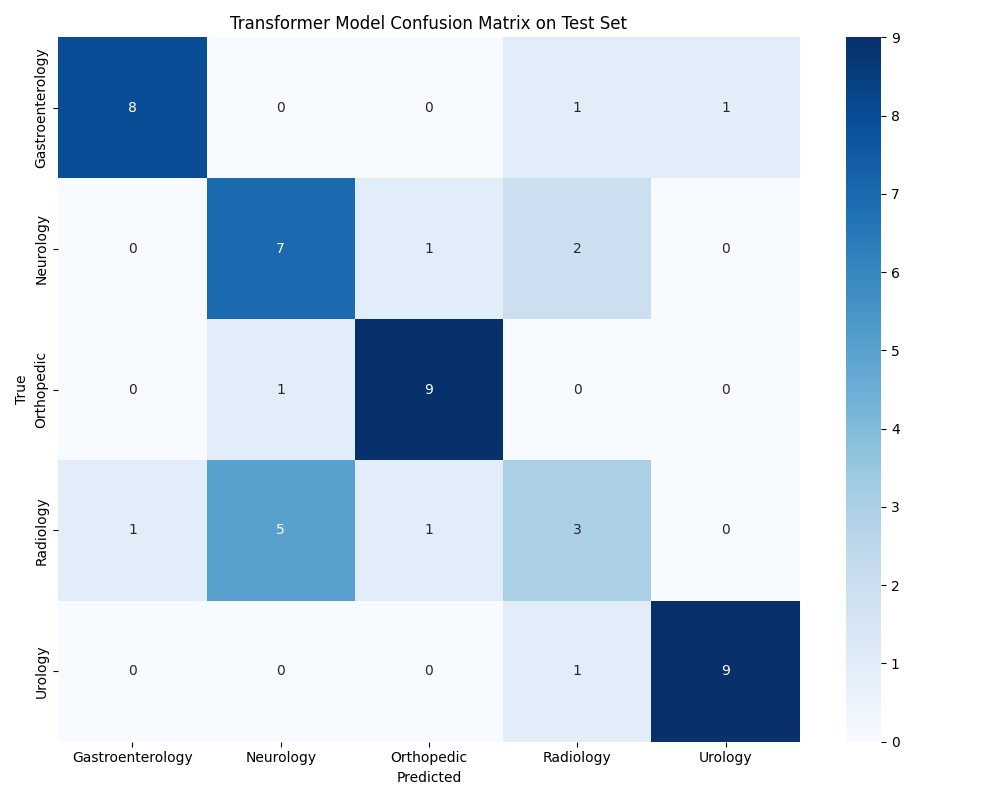
On the 50 test notes it scores 72% accuracy and a macro F1 of 0.71. Urology, orthopedics and gastroenterology are reliable (F1 0.84 to 0.90). Radiology is the weak spot (F1 0.35): a scan report is often also a neurology note. The data shows how blurred that line is: one CT report of the cervical spine appears twice in the test set, once labelled neurology and once radiology.
The application is a FastAPI service in Docker that takes one or more PDFs and returns the specialties as JSON, for example {"prediction": ["radiology", "urology"]}. It extracts the text with PyPDF2, uses Gemini to find where each note starts and ends in complex layouts, splits notes longer than the model's limit, and logs every step of every request. A small Svelte front-end sits on top.
For this page I made the demo run in the browser, so nothing is uploaded, which matters for anything medical. I exported the model to ONNX and quantised it to 8-bit weights, because the browser downloads it once: that brings it from 433 MB to 109 MB. On the 50 test notes the 8-bit model gives the same answer as the original for 49 notes; the one it changes was a near tie in the original (45% neurology against 44% radiology), so accuracy shows 70% instead of 72%. The tokenizer is rewritten in JavaScript and checked against the original on all 776 notes, token for token.
In the demo, notes are found by the headings of the sample PDFs, and repeated letterheads and page numbers are removed; the original application used Gemini for that step, so it also handles layouts without clear headings.
Try it yourself
What this is: the fine-tuned model itself, running in your browser. It sorts medical notes into five specialties: gastroenterology, neurology, orthopedics, radiology and urology.
What to do: pick one of the five sample PDFs, or write a note of your own. The steps on the right show the PDF being read, split into separate notes and classified, then each note's specialty and how sure the model is.
What to expect: the first time, the model (109 MB) downloads, which can take a little while; after that it is stored in your browser and a PDF takes a few seconds. Nothing is uploaded.
Choose a sample PDF
What happens
- Read the PDF
- Split it into notes
- Classify each note
Loading the demo…
In pictures
How it is built
The model and the PDF handling are separate on purpose. The service only receives files and returns labels; behind it, the pipeline reads the text, lets Gemini decide where one note ends and the next begins (PDFs mix layouts, tables and several notes per file), and only then lets the fine-tuned model classify each note.
Front-end and service run as two containers in Docker Compose, and the same pipeline also runs from the command line on a folder of PDFs (the dashed line). Each request writes its own log folder, so a wrong label can be traced back to the text and the split that produced it. The demo on this page keeps only the classifier and runs it in your browser.